
Key Takeaways:
- CUI is sensitive but unclassified information created by or for the government, and it must be protected according to federal rules.
- There are two categories of CUI: CUI Basic (protected under NIST 800-171) and CUI Specified (tied to specific laws or regulations that add extra requirements).
- Identifying where CUI lives is essential — including which systems, tools, vendors, and users touch or store it.
- CUI must be marked and handled correctly, with consistent labeling and controls for sharing, storing, and transmitting it.
- Companies handling CUI must meet CMMC requirements, which usually means securing data in compliant environments like Microsoft GCC High and following NIST 800-171 practices.
Speak with our team
What Is Controlled Unclassified Information?
Controlled Unclassified Information (CUI) is information that the government creates or possesses, or that an entity creates or possesses for or on behalf of the government, that a law, regulation, or government-wide policy requires or permits an agency to handle using, safeguarding, and disseminating controls.
The label covers a wide range of information including personal information, proprietary information, or information considered critical to national security.
In order to tell you how to protect CUI, we first have to answer how to identify, classify, and handle it.
What are CUI assets?
CUI assets are assets that process, store, or identify CUI.
It’s critical to understand that these assets are essential to the success of a Defense Industrial Base (DIB) organization in its support of the Department of War (DoW), so identifying them should be at the top of your list for healthy cybersecurity practice. Organizations should clearly define the workstations, file servers, cloud collaboration services, and/or managed service providers (MSPs).
Read more: How to Identify CUI Assets
Identifying and Categorizing CUI
When trying to determine if your organization has CUI, try asking yourself these questions:

- C – Is the data originally Created by the government and provided to you in association with the contract?
- U – Is the data going to be Used to deliver your contractual responsibilities to the government?
- I – Can the data type be Identified within the sub-categories listed on the NARA CUI registry?
These three criteria should help you navigate whether the data you’re handling is controlled.
Identifying CUI with Microsoft 365
Microsoft Purview helps defense contractors identify CUI in their IT systems to comply with Cybersecurity Maturity Model Certification (CMMC) 2.0 requirements.
Learn more about effectively identifying CUI in your current IT environment using the Microsoft 365 platform:
Read more: Identifying CUI with Microsoft 365 For CMMC
How to Identify CUI Outside of Microsoft 365
As you work through the process of identifying CUI, one question that might come up is around how to find it outside of Microsoft 365.
Locating data containing CUI outside of your Microsoft 365 environment is a bit of a process. You’ll need to map all of your internal processes and data flows to identify potential areas where it might be residing outside of Microsoft 365.
To learn more about Summit 7’s our CMMC Level 2 solution and CUI scoping project, reach out to us here.
How to Categorize CUI Using a Web Search
For this example, we’re going to use the National Archives CUI website. Visit the website, then click on Category list.
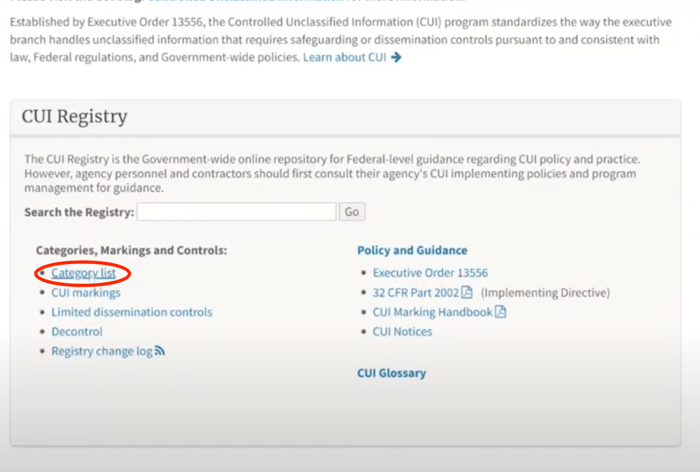
You’ll see a column called Organizational Index Groupings with the CUI categories underneath.
Narrow Your Search by Information Type
One of the examples we like to talk about when it comes to CUI is Controlled Technical Information (CTI), which is found next to the Defense section.
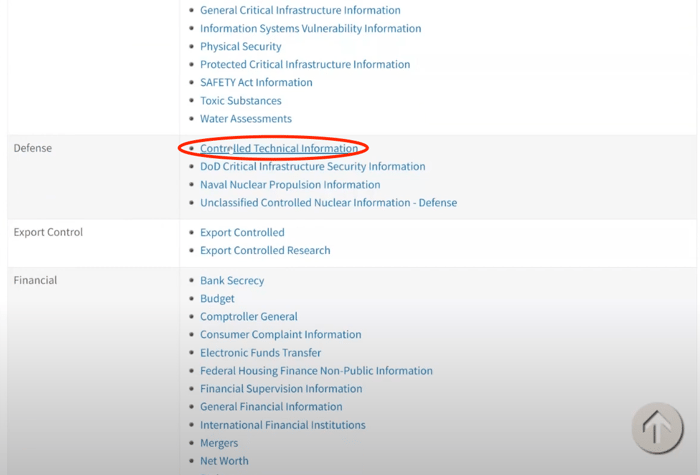
Once you click CTI, you’ll see a description of the category. This one has a long category description, but it’s basically telling you what CTI is, where the reference documentation is located, that DFARS 7013 has the definition and other helpful information.
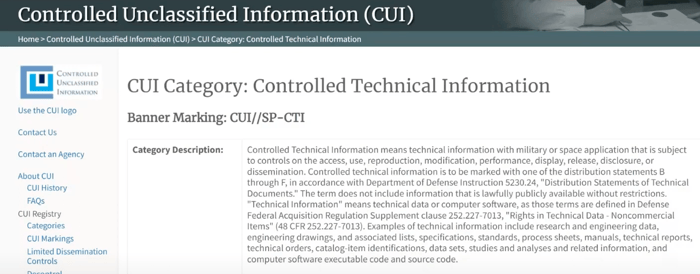
As you read through it, you might start to think that everything is CUI. But if you look all the way down at the very bottom of the CTI page, you’ll see a table with a heading titled Safeguarding and/or Dissemination Authority.
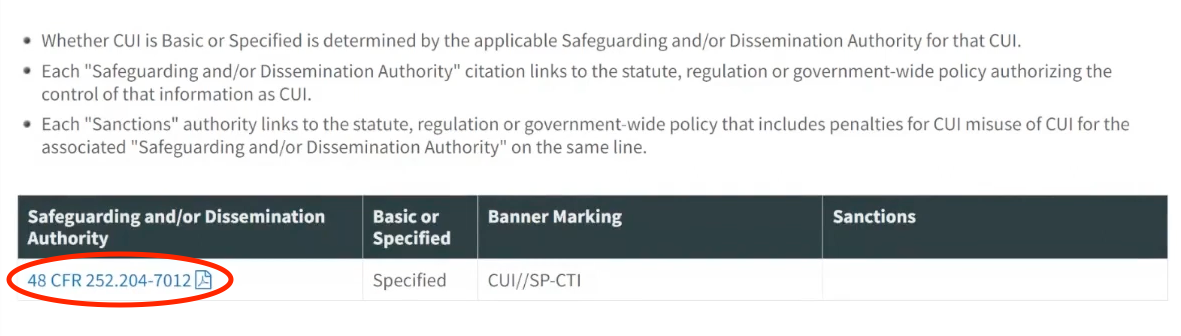
This is going to tell you which reference document to look at to determine if this applies to you. It’s also going to tell you if it’s Basic or Specified CUI as well as the banner marking that you’re going to need if/when you mark it.
Next, click the link under the Safeguarding and/or Dissemination Authority heading, you’ll open a document listing the types of systems that you need, how you need to configure them, which type of a cloud environment you need to use, all wrapped up in this document.
For the sake of this example, do a search in the document for “Controlled Technical Information” and you’ll see the definition of what CTI is. It even goes into things like distribution statements that you might see coming from the DoW.
From here, you may wonder what is considered ‘technical information’?
Be thorough. Definitions are rarely just semantics.
As you scroll over within that same clause, it defines “technical information” as technical data or computer software as they are defined in the referenced DFARS clause.
From there, the title of the clause, “Rights in Technical Data for Non-Commercial Items”, tells you that the definition does not apply to consumer off-the-shelf items. This means that if you can grab it from Walmart, this clause doesn’t apply.
As you dig deeper, try searching for the clause that’s referenced in the document. In this case, it’s “DFARS 252.227–7013”. If you do a web search for it, you’ll find a page on Acquisition.gov with the document on it.
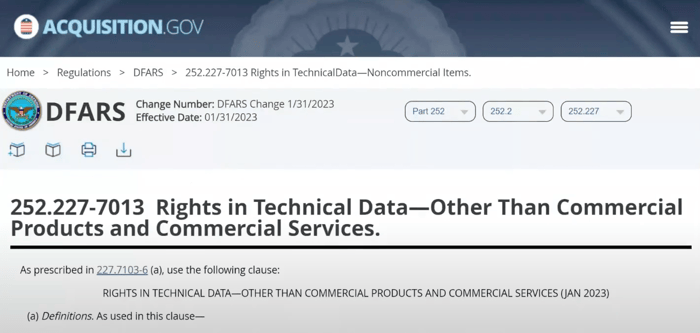
As you’re going through that page, you’ll see that it covers definitions of computer database, computer program, and computer software.
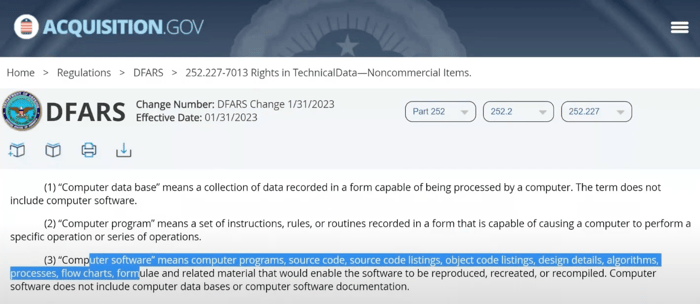
This is what helps you refine and understand if the data you’re handling is actually going to be CUI, or in this case CTI.
Read more: Identifying CUI with Microsoft 365 For CMMC
Types of CUI: Basic vs Specified
There are 125 total CUI categories and 20 larger index groupings within the National Archives and Records Administration (NARA) CUI Registry. To further investigate your data, determine its type: CUI Basic or CUI Specified.
What is CUI Basic?
CUI Basic is CUI that only requires applying National Institute of Standards and Technology (NIST) 800-171 to protect such information. If you see the Basic marking, unless otherwise educated with other controls, you’re going to apply NIST 800-171 in that environment and around that data.
CUI Basic contains the baseline handling and dissemination controls as identified in the Final Rule issued by NARA on November 14, 2016.
The Federal Information Systems Modernization Act (FISMA) requires contractors to protect CUI Basic at the FISMA Moderate level and mark it properly.
Agencies cannot increase CUI Basic’s impact level above moderate external to their agency without an agreement with the external agency or contractor organization operating an information system on their behalf.
What is CUI Specified?
CUI Specified is a subset where the authorizing law, policy, or regulation puts more restrictive controls on the handling and control of the content.
CUI Specified is data that has a law, regulation, or government-wide policy saying you have to do things above and beyond NIST 800-171 to protect the data.
For example, you must comply with the Defense Federal Acquisition Regulation Supplement (DFARS) 7012 which says you have to (among other things):
- Do cyber incident reporting with covered defense information
- Do flow-downs for potential forensic imaging
- Have an appropriately built external cloud provider if you are using such technology
The underlying authority maintains the handling controls on CUI Specified content, and ONLY a designating agency may apply the limited dissemination controls to CUI content. Agencies outside of the original designating authority cannot do this.
Common Mistakes with Identifying CUI
It’s important to remember that not everything is CUI.
For example, some companies think their budget should be considered CUI. They might be concerned about Enterprise Resource Planning (ERP) systems and other kinds of technology pertaining to budget. In an abundance of caution, they’ll overclassify, which creates an unnecessary burden for those handling it.
If that company researched the financial category on the DoW CUI Program site, they’d find that a budget is only CUI Specified when it’s for federal agencies.
Further, you should consider whether data has a government-wide policy, law, or regulation in place that applies to contractors. Going back to our budget example, if you’re not a federal agency reporting your budget to the Office of Management and Budget, then there’s no reason to consider it CUI.
Marking CUI
This video from the U.S. National Archive explains how organizations can properly mark CUI data. Summit 7 does not own the rights to this video.
Why The CUI Program Was Created
Before CUI, every agency used a different set of markings, information classifications, and rules for how to manage and control unclassified information. To resolve industry confusion on data handling, the DoW streamlined those categories into the CUI umbrella. Executive Order 13556 established the CUI Program to standardize the way the government and contractors handle and protect unclassified information.
How do I protect CUI?
- Book time with a Summit 7 expert to determine your path toward better cybersecurity.
- Implement NIST SP 800-171 if you have not already done so. if you have not already done so.
- Prepare with a CMMC Third-Party Assessment Organization (C3PAO).
Free On-Demand Webinar:

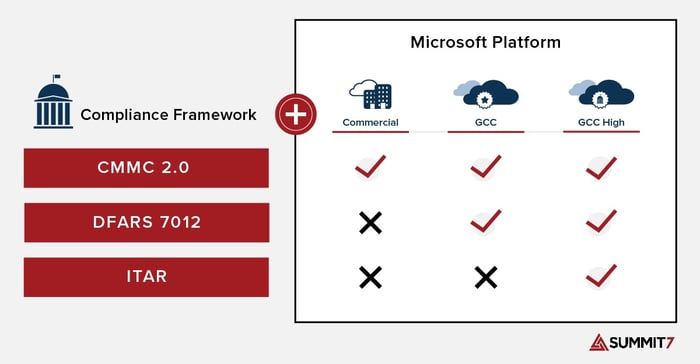
Many DoW contractors choose to handle sensitive data such as CUI and International Traffic in Arms Regulation (ITAR) data in the Microsoft Government Cloud. There are two suitable versions of M365 for handling CUI: Microsoft 365 GCC High and Microsoft 365 GCC.
While not required to meet CMMC at any Level, Microsoft recommends GCC High for organizations pursuing CMMC 2.0 Level 2.
The graphic below represents the Microsoft Platform as it relates to relevant compliance frameworks such as CMMC, DFARS 7012, and ITAR regulations.
DoW Mandatory CUI Training
DoW Mandatory CUI Training is a comprehensive training program implemented by the DoW to educate its personnel on the proper handling, protection, and dissemination of CUI. It covers identifying CUI, marking and handling procedures, storage and transmission protocols, incident reporting, and the consequences of mishandling CUI.
DoW Mandatory Training Preparation questions:
- Information may be CUI in accordance with: a law, regulation, or government-wide policy.
- The correct banner marking for UNCLASSIFIED documents with CUI is: CUI.
- The correct banner marking for a co-mingled document containing TOP SECRET, SECRET, and CUI is: TOP SECRET.
- I don’t have a security clearance, so I don’t have to get a pre-publication review. FALSE.
- In order to obtain access to CUI, an individual must first have: a lawful government purpose.
- Who is responsible for applying CUI markings and dissemination instructions? Authorized holder of the information at the same time of creation.
- At the time of creation of CUI material, the authorized holder is responsible for determining: CUI category, CUI markings, and dissemination instructions.
- What is the purpose of the Information Security Oversight Office (ISOO) CUI Registry? A government-wide online repository for federal-level guidance regarding CUI policy and practice.
- It is mandatory to include a banner marking at the top of the page to alert the user that CUI is present. True.
- What is CUI? Unclassified information requiring safeguarding and dissemination controls, pursuant to and consistent with applicable laws, regulations, and government-wide policies.
- Administrative, civil, or criminal sanctions may be imposed if there is an Unauthorized Disclosure (UD) of CUI. True.
- What level of system and network configuration is required for CUI? Moderate confidentiality.
- CUI documents must be reviewed according to which procedures before destruction? Records Management.
- What is the goal of destroying CUI? To make it unreadable, indecipherable, and unrecoverable.
- What is CUI Specified? The subset of CUI in which the authorizing law, regulation, or government-wide policy contains specific handling controls that it requires or permits agencies to use.
- What is CUI Basic? The subset of CUI for which the authorizing law, regulation, or government-wide policy does not set out specific handling or dissemination controls.
- What marking (banner and footer) acronym (at a minimum) is required on a DoW document containing CUI? CUI.
- Who can decontrol CUI? Original Classification Authority (OCA), if in a Security Classification Guide, or the designated office for decontrolling.
- What DoW instruction implements the DoW CUI program? DoDI 5200.48, CUI.
- Who is responsible for protecting CUI? DoW military, civilians, and contractors.
- What Is Controlled Unclassified Information?
- What are CUI assets?
- Identifying and Categorizing CUI
- Identifying CUI with Microsoft 365
- Types of CUI: Basic vs Specified
- Common Mistakes with Identifying CUI
- Marking CUI
- Why The CUI Program Was Created
- How do I protect CUI?
- DoW Mandatory CUI Training
- DoW Mandatory Training Preparation questions:
Next, learn more about protecting CUI in Microsoft Government here:
Reach out to a Summit 7 expert to begin your journey today.
Contact
Speak With Our Team
Our team of compliance and cybersecurity experts are on standby and ready to help. We’ll walk you through what you need and what to expect.